

Nethunt CRM Review
"NetHunt CRM excels in CRM solutions with its unmatched Gmail integration! Watch your email clients transformed into a productivity powerhouse, revolutionizing your customer interactions and boosting business success."
- Case Management
- Contact Manager
- CRM (Customer Relationship Management)
- CRM & Sales Dashboards
- CRM & Sales Reports
- CRM Analytics
- Customer Management
- Customer Support
- Developer API
- Email Integration
- Email Templates
- Lead Generation
- Mass Email
- Sales Forecasting
- Sales Tracking
- Opportunity Management

Amount of users
1+
Training/Documentation

Online Support
Mobile Access
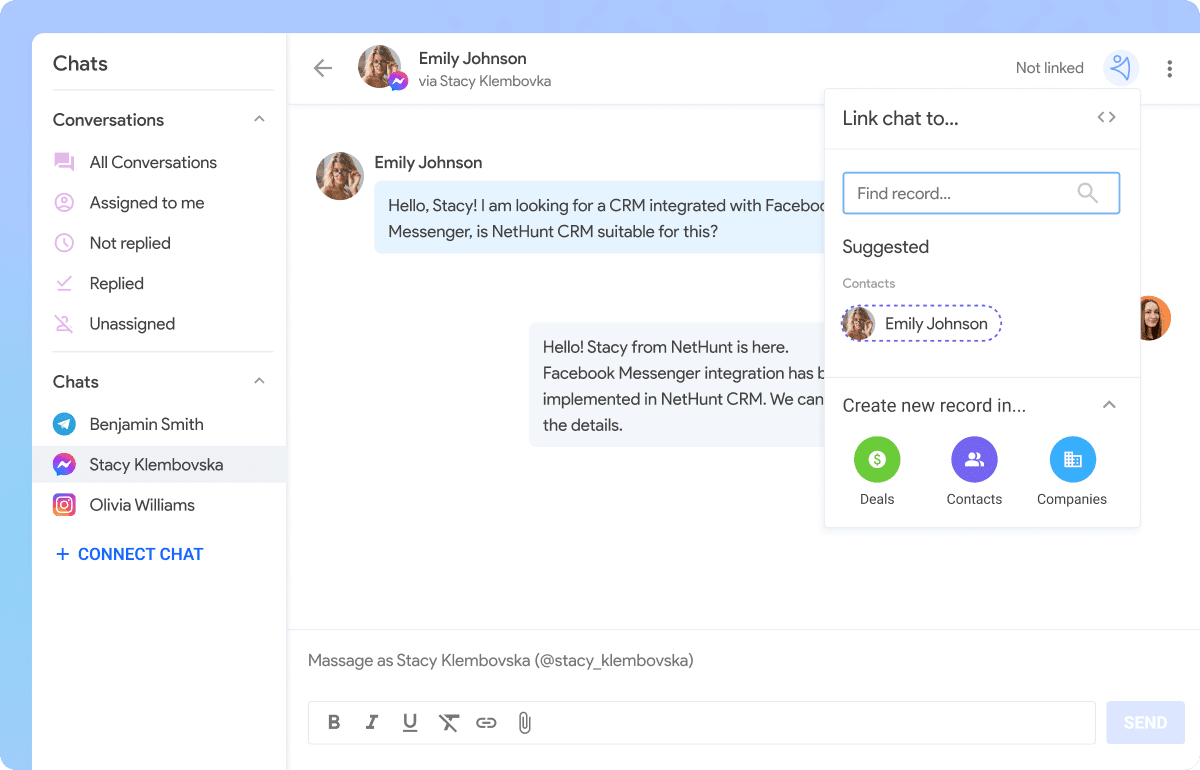
What gets synced? Direct messages. Post comments. Story comments.

Lead management attracts potential clients, arranging and generating more customers to boost your business effectively.

Project management functions efficiently handle your projects, delivering optimal assistance throughout the process.

NetHunt's contact management stores and finds contacts effortlessly, no need to search through records—simplified customer contact retrieval.

NetHunt's email marketing sends vital info and group messages, saving time. An effective strategy widely used by marketers.
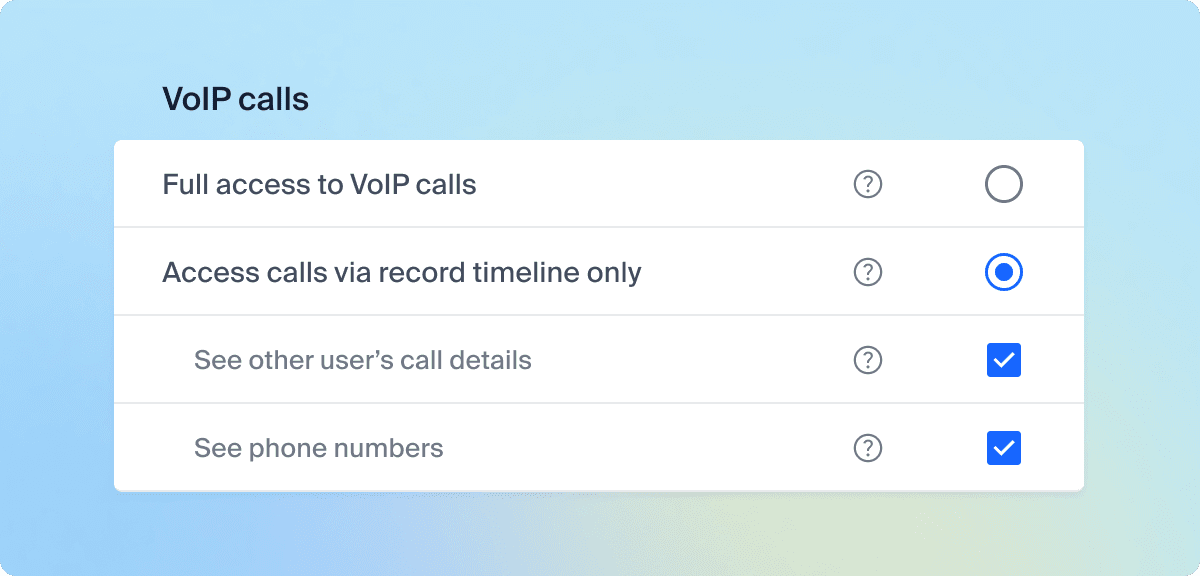
VoIP call access settings within a CRM, allowing users to control call visibility, view call details, and access phone numbers.
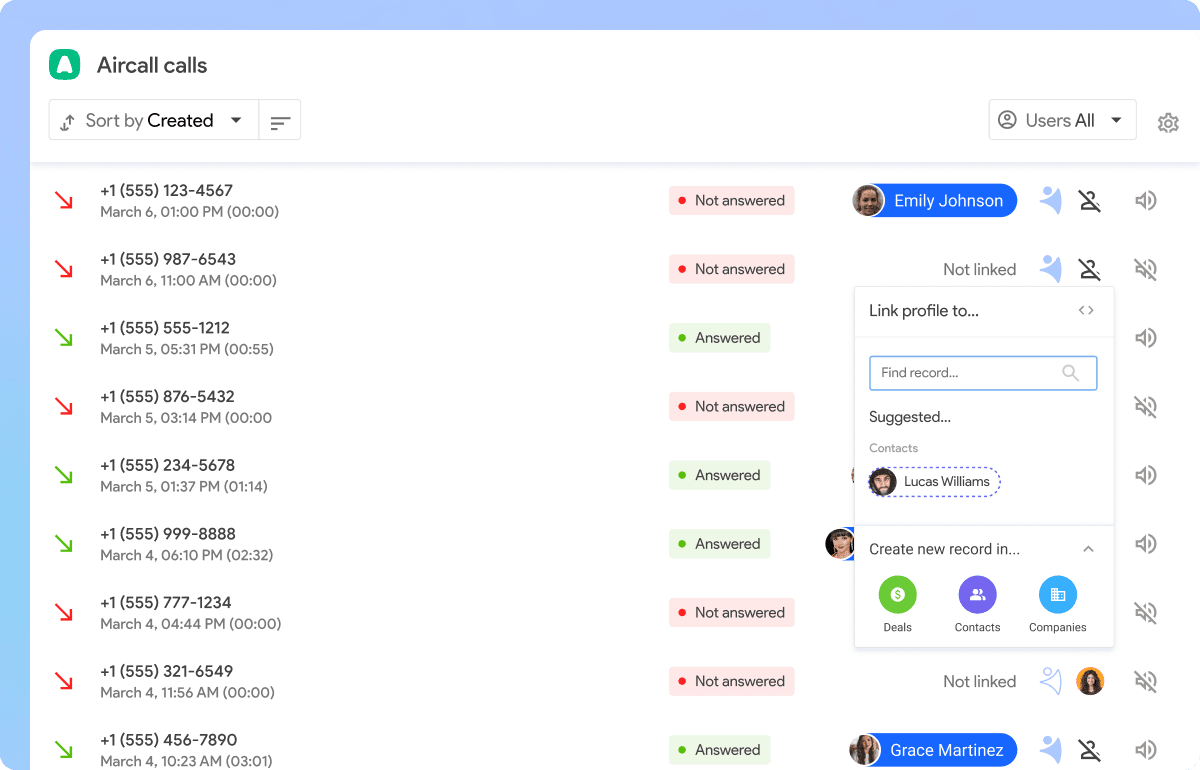
New VoIP Integration: Aircall is here!
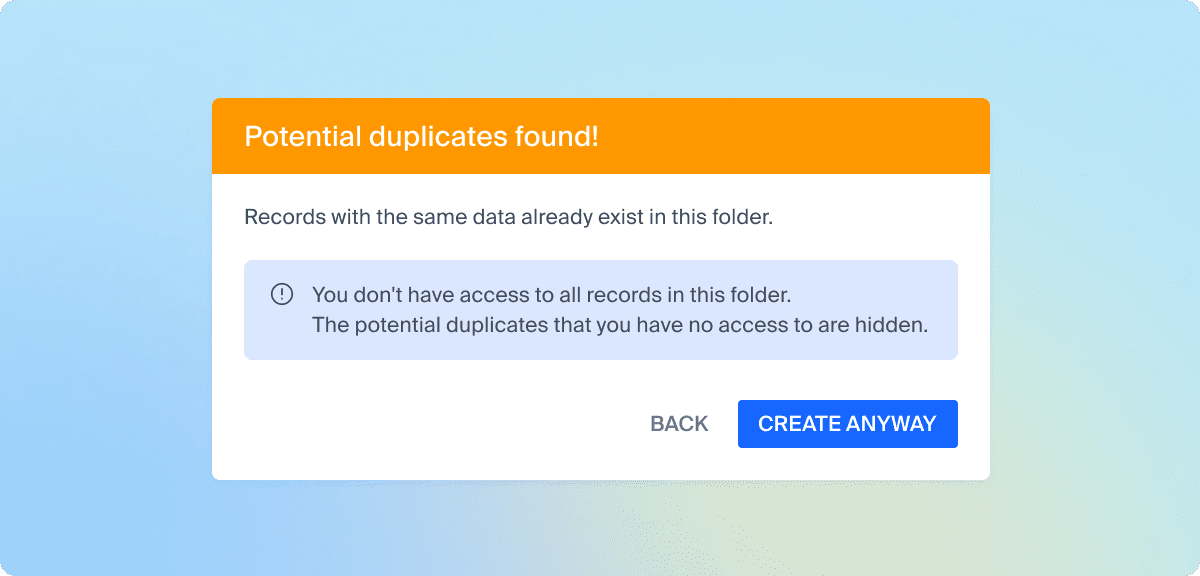
Smarter Duplicate Detection. Even users with restricted access to records now get notified when trying to add a duplicate — without seeing the full record.
If your business lives inside Gmail every day, NetHunt CRM is one of the most compelling customer relationship management platforms available. Instead of forcing your team to juggle multiple applications, it transforms Gmail into a fully featured CRM where emails, contacts, deals, tasks, and customer information all work together seamlessly.
For many small businesses, that simple approach is exactly what makes NetHunt stand out. Your team can continue working in an interface they already know while gaining powerful sales automation, customer management, reporting, and AI-powered productivity tools.
However, NetHunt isn’t the perfect CRM for every organisation. Businesses built around Microsoft 365, those requiring enterprise-level reporting, or companies looking for sophisticated marketing automation may find stronger alternatives elsewhere.
After reviewing NetHunt CRM’s latest features, pricing, automation capabilities, integrations, AI tools, and overall user experience, we believe it remains one of the best CRM solutions for Google Workspace users in 2026.
If your business already runs on Gmail, NetHunt deserves a place on your shortlist.
Our Verdict
| Overall Rating | ⭐⭐⭐⭐⭐ 4.6/5 |
|---|---|
| Best For | Small businesses using Gmail and Google Workspace |
| Ease of Use | ⭐⭐⭐⭐⭐ |
| Automation | ⭐⭐⭐⭐⭐ |
| Value for Money | ⭐⭐⭐⭐☆ |
| Customer Support | ⭐⭐⭐⭐☆ |
| Customisation | ⭐⭐⭐⭐⭐ |
Best For
- Small to medium-sized businesses
- Sales teams
- Consultants
- Recruitment agencies
- Marketing agencies
- Real estate professionals
- Businesses already using Google Workspace
Not Ideal For
- Microsoft 365-focused businesses
- Large enterprise organisations
- Companies requiring advanced enterprise analytics
- Businesses wanting extensive built-in marketing automation
What We Like
✔ Outstanding Gmail integration
✔ Extremely easy to learn
✔ Excellent workflow automation
✔ Highly customisable pipelines
✔ Strong collaboration tools
✔ Built-in email marketing
✔ Continually improving AI features
What Could Be Better
✘ Best experience requires Google Workspace
✘ Some advanced features require higher-tier plans
✘ Reporting isn’t as advanced as some enterprise CRMs
NetHunt CRM at a Glance
| Feature | Details |
|---|---|
| Best For | Small to medium-sized businesses using Gmail and Google Workspace |
| Starting Price | From approximately $30 per user/month (annual billing) |
| Free Trial | 14 Days |
| CRM Type | Cloud-Based Gmail CRM |
| Mobile Apps | Android & iOS |
| AI Features | Yes |
| Workflow Automation | Advanced |
| Email Marketing | Included |
| Custom Pipelines | Unlimited |
| Reporting | Custom Dashboards & Analytics |
| Integrations | Google Workspace, Slack, QuickBooks, LinkedIn, Mailchimp, Zapier and many more |
Why Trust Our NetHunt CRM Review?
At SmallBizCRM, we don’t believe the best CRM is the one with the longest feature list. It’s the one that helps small businesses work more efficiently every day.
When evaluating CRM software, we look beyond marketing claims and focus on the factors that matter most to business owners:
- Ease of implementation
- Day-to-day usability
- Automation capabilities
- Scalability
- Value for money
- Customer support
- Integration options
- Overall suitability for small businesses
We also regularly update our reviews as vendors introduce new features and improvements. NetHunt has continued to invest heavily in automation, AI, reporting, and integrations, making this one of the most up-to-date CRM reviews available.
Why Choose NetHunt CRM?
Many CRM platforms expect you to change the way your business works.
NetHunt takes the opposite approach.
Instead of asking users to leave Gmail and learn an entirely new application, it brings CRM functionality directly into the inbox where many businesses already spend most of their working day.
That seemingly small difference has a surprisingly large impact on productivity.
Rather than constantly switching between email, spreadsheets, calendars, and CRM software, everything is managed from one familiar interface. Customer emails automatically become part of the CRM record, follow-up reminders can be created in seconds, deals are updated without opening another application, and your entire sales history remains accessible whenever you need it.
For many small businesses, this dramatically reduces administrative work.
From our perspective, this is NetHunt’s biggest competitive advantage. Plenty of CRM systems integrate with Gmail, but very few feel like Gmail has become the CRM itself.
If your team already relies on Google Workspace, adoption is likely to be far quicker than with many traditional CRM platforms.
First Impressions
One of the first things that stands out about NetHunt CRM is how familiar everything feels.
Many CRM systems overwhelm new users with dashboards, menus, terminology, and complex setup processes. NetHunt largely avoids that problem because much of the interface already exists inside Gmail.
The learning curve is noticeably shorter than many competing platforms.
That doesn’t mean NetHunt is basic. Far from it.
Behind the clean interface sits a highly flexible CRM capable of managing sales pipelines, customer databases, recruitment processes, property enquiries, customer support, project workflows, and much more.
What impressed us most is how well NetHunt balances simplicity with flexibility.
Beginners can start using it almost immediately, while growing businesses have enough customisation options to build workflows around their own processes instead of adapting to rigid software limitations.
For small businesses making the move from spreadsheets or simple contact lists, this can make the transition to a dedicated CRM far less intimidating.
Key Features
NetHunt continues to expand its feature set while keeping the platform refreshingly easy to use. Rather than adding complexity for the sake of it, most new capabilities focus on helping businesses automate repetitive work and manage customer relationships more efficiently.
Let’s look at the features that make the biggest difference in everyday use.
- Gmail-Native CRM
This is still the feature that sets NetHunt apart.
Instead of opening a separate CRM application every time you need customer information, NetHunt places customer records directly alongside your emails.
Every conversation becomes part of a customer’s history.
Tasks, notes, deals, reminders, and previous communications are all available without leaving Gmail.
Our Take
This isn’t just a convenient feature.
For businesses that spend hours each day answering enquiries and following up with customers, it removes hundreds of unnecessary clicks every week.
That’s exactly the kind of productivity improvement small businesses appreciate.
- Flexible Sales Pipelines
Every business sells differently.
NetHunt recognises this by allowing users to build completely customised sales pipelines instead of forcing everyone into a standard sales process.
Each stage can trigger automated actions, reminders, notifications, or task creation, helping opportunities move smoothly from initial enquiry through to completed sale.
The drag-and-drop interface keeps everything intuitive, while managers gain an instant overview of sales performance and potential bottlenecks.
Our Take
This flexibility makes NetHunt suitable for far more than traditional sales teams.
Recruitment agencies can track candidates, real estate professionals can manage property enquiries, consultants can monitor client projects, and service businesses can build workflows that reflect the way they already operate.
- Contact and Lead Management
NetHunt goes well beyond basic contact management.
Every customer record can include:
- Communication history
- Notes
- Documents
- Tasks
- Purchase history
- Tags
- Custom fields
- Relationships between records
Lead capture forms automatically feed enquiries into the CRM, while assignment rules ensure leads reach the right salesperson quickly.
For growing businesses handling increasing enquiry volumes, this creates a much more organised sales process.
Our Take
One of the biggest reasons businesses lose potential customers is poor follow-up.
NetHunt helps eliminate that problem by ensuring every enquiry is recorded, assigned, and tracked from the moment it arrives.
For many small businesses, that alone can improve conversion rates.
AI Features That Help Small Businesses Work Smarter
Artificial intelligence is becoming a standard feature in modern CRM software, but not every CRM uses it in a practical way. Some platforms add AI simply to keep up with industry trends, while others use it to solve genuine business challenges.
NetHunt falls into the second category.
Rather than trying to replace the personal relationships that drive successful sales, NetHunt uses AI to reduce repetitive work, improve communication, and help businesses stay organised. The result is a CRM that feels more efficient without becoming more complicated.
One of the platform’s most useful AI capabilities is its assistance with email creation. Users can generate professional email drafts, rewrite messages, adjust tone, and personalise communications much faster than writing everything manually. For busy sales teams responding to dozens of enquiries each day, this can save a significant amount of time while maintaining a consistent level of professionalism.
AI also assists with data quality by helping keep customer records organised and reducing manual data entry. When combined with NetHunt’s workflow automation, businesses spend less time updating records and more time focusing on customers.
Although NetHunt’s AI capabilities are not as extensive as some enterprise CRM platforms, we think the company has taken the right approach. The tools are designed to support your daily work rather than overwhelm you with features you may never use.
Our Take
For most small businesses, practical AI is far more valuable than flashy AI.
NetHunt focuses on helping your team communicate faster, stay organised, and reduce administration. That’s likely to deliver greater day-to-day value than complex AI features that require weeks of training.
Powerful Workflow Automation
Automation has become one of the biggest reasons businesses invest in CRM software, and it’s an area where NetHunt performs exceptionally well.
Instead of relying on employees to remember every follow-up, assign every lead, or update every customer record manually, NetHunt automates many of these tasks in the background.
Businesses can create workflows that trigger automatically whenever specific events occur.
Examples include:
- A new lead submits an enquiry form
- A deal moves to the next pipeline stage
- A customer replies to an email
- A follow-up date arrives
- A record is updated
- A deal becomes inactive
- A proposal is accepted
These triggers can automatically:
- Create new tasks
- Assign leads
- Notify team members
- Update customer records
- Send follow-up emails
- Move deals through the pipeline
- Schedule reminders
- Launch onboarding workflows
Because everything happens automatically, businesses can maintain a far more consistent sales process without increasing administrative work.
Our Take
This is one of the strongest areas of the platform.
Many small businesses lose opportunities because someone forgets to follow up or update a spreadsheet. NetHunt dramatically reduces that risk by ensuring routine processes happen automatically.
It’s not just about saving time. It’s about making sure opportunities don’t slip through the cracks.
Built-In Email Marketing
Unlike many CRM platforms that depend heavily on third-party email marketing software, NetHunt includes built-in email marketing tools that allow businesses to create, send, and monitor campaigns from within the CRM.
Using customer information already stored in the database, businesses can create highly targeted mailing lists based on factors such as:
- Industry
- Sales stage
- Location
- Previous purchases
- Customer tags
- Custom fields
- Past interactions
This allows businesses to send more relevant campaigns instead of treating every customer the same.
Campaign performance is tracked through detailed reporting, including delivery rates, open rates, clicks, replies, and engagement levels. These insights help businesses continually improve future campaigns.
Because marketing activity remains connected to each customer record, sales and marketing teams always have a complete picture of every interaction.
Our Take
This won’t replace dedicated enterprise marketing platforms like Keap for every business.
However, many small businesses don’t actually need separate email marketing software.
If your goal is sending targeted campaigns while keeping customer information in one place, NetHunt’s built-in tools are more than capable.
Streamlined Customer Communication
Strong customer relationships depend on consistent communication.
NetHunt helps achieve this by bringing emails, customer records, notes, tasks, reminders, and follow-up activities together inside one central workspace.
Every interaction becomes part of a customer’s history, making it easy for anyone on your team to understand previous conversations before contacting a customer.
That continuity becomes increasingly valuable as businesses grow.
Instead of relying on individual employees to remember every conversation, the CRM maintains a complete communication history that the entire team can access.
Email templates further improve efficiency by allowing businesses to standardise common responses while still adding personal touches where needed.
When combined with automated follow-up sequences, NetHunt helps ensure that no enquiry is forgotten.
Our Take
One of the biggest complaints we hear from small business owners is:
“I know someone contacted us… but I can’t remember who replied.”
NetHunt virtually eliminates that problem by recording every interaction in one place.
That alone can make customer service feel far more professional.
Sales Pipeline Management
Every successful sales process depends on visibility.
If you can’t clearly see where opportunities are sitting, it’s difficult to forecast revenue or identify bottlenecks before they become problems.
NetHunt provides a highly visual pipeline management system that makes tracking opportunities simple.
Businesses can create multiple pipelines for different products, departments, or business units, with each stage customised to reflect their own sales process.
Rather than adapting your business to suit the software, NetHunt allows the software to adapt to your business.
Managers can assign probabilities, automate actions, monitor stalled deals, and forecast future sales from clear visual dashboards.
The drag-and-drop interface keeps updating opportunities quick and intuitive.
Our Take
This is one of those features that sounds ordinary until you start using it.
Having a visual pipeline gives business owners an immediate understanding of where revenue is coming from and which deals need attention.
It’s one of the simplest ways to improve sales management.
Collaboration Across Your Team
As businesses grow, keeping everyone on the same page becomes increasingly difficult.
Customer information often ends up scattered across inboxes, spreadsheets, notebooks, and messaging apps.
NetHunt solves this by creating a single shared customer database that everyone can access based on their permissions.
Team members can:
- Assign tasks
- Leave notes
- Mention colleagues
- Monitor deal progress
- Share communication histories
- Track customer activity
Managers also benefit from improved visibility into team performance, allowing them to identify delays, monitor workloads, and provide support where needed.
Remote and hybrid teams particularly benefit from this collaborative approach because everyone works from the same information regardless of location.
Our Take
For many businesses, collaboration isn’t about having more meetings.
It’s about ensuring everyone is looking at the same customer information.
NetHunt achieves this extremely well without making collaboration feel complicated.
Reporting and Analytics
Good decisions depend on good information.
NetHunt provides a flexible reporting system that helps businesses monitor performance without overwhelming users with unnecessary complexity.
Custom dashboards allow businesses to track the metrics most relevant to them, including:
- Sales performance
- Pipeline health
- Lead conversion rates
- Team productivity
- Revenue forecasts
- Deal progression
- Customer activity
Reports can be filtered by date, sales representative, lead source, pipeline stage, products, or custom fields, giving managers detailed insight into business performance.
Because reports update in real time, decision-makers always have access to current information.
Our Take
If you’re looking for enterprise-level business intelligence, there are CRMs with more advanced analytics.
However, for most small and medium-sized businesses, NetHunt strikes an excellent balance.
The reports are detailed enough to help you make better decisions without requiring a data analyst to understand them.
How NetHunt Compares to Other Popular CRMs
Choosing a CRM is rarely about finding the “best” platform. It’s about finding the one that best fits the way your business works.
Here’s how NetHunt compares with some of its biggest competitors.
| If You Want… | Our Recommendation |
|---|---|
| The best Gmail integration | NetHunt CRM |
| The easiest CRM to learn | Less Annoying CRM |
| Excellent all-round simplicity | Capsule CRM |
| Powerful marketing automation | Keap |
| Highly visual sales pipelines | Pipedrive |
| A generous free CRM | HubSpot CRM |
Our Take
NetHunt’s biggest strength isn’t that it has the longest feature list.
Its strength is that it makes CRM feel like a natural extension of Gmail.
For businesses already invested in Google Workspace, that’s a compelling advantage that few competitors can match.
Integrations
One of NetHunt CRM’s greatest strengths is that it doesn’t ask businesses to replace the software they already use. Instead, it integrates with many of the most popular business applications, allowing customer information to flow naturally between platforms.
At the centre of the ecosystem is Google Workspace.
Because NetHunt was built specifically for Gmail users, it works seamlessly with:
- Gmail
- Google Calendar
- Google Contacts
- Google Drive
- Google Chat
This creates a unified workspace where emails, meetings, files, customer records, and sales activities remain connected without requiring duplicate data entry.
Beyond Google Workspace, NetHunt also integrates with a growing list of third-party business applications, including:
- Slack
- Zapier
- Mailchimp
- QuickBooks
- Aircall
- RingCentral
- PandaDoc
- Calendly
- Typeform
- Intercom
- Facebook Lead Ads
- WhatsApp (through supported integrations)
One integration worth highlighting is Zapier. It opens the door to thousands of additional apps, enabling businesses to automate workflows without needing technical expertise. Whether you want enquiries from your website to create CRM records automatically or invoices to trigger customer updates, Zapier greatly extends NetHunt’s capabilities.
For organisations with specialised requirements, NetHunt also offers an API, making it possible to build custom integrations with proprietary software.
Our Take
This is an area where NetHunt quietly excels.
Rather than trying to become an all-in-one business platform, it works exceptionally well alongside the tools most small businesses already rely on. That makes implementation far easier and reduces disruption for your team.
Mobile App
Business doesn’t stop when you leave your desk, and neither should your CRM.
NetHunt offers mobile apps for both Android and iOS, giving users access to customer information wherever work takes them.
Using the mobile app, you can:
- View customer records
- Update opportunities
- Manage sales pipelines
- Create and complete tasks
- Review communication history
- Contact customers
- Add notes after meetings
- Track ongoing sales activity
For sales representatives visiting clients, this means customer information is always available before, during, and after meetings.
Managers also benefit from being able to monitor pipeline activity, review performance, and stay informed even when travelling.
Our Take
Some CRM mobile apps feel like stripped-down versions of the desktop platform.
NetHunt’s mobile experience is surprisingly capable and retains the clean, straightforward design that makes the desktop version so easy to use.
For businesses with remote staff or field sales teams, it’s a valuable addition.
Security and Data Protection
Customer information is among a business’s most valuable assets, so security should never be an afterthought when choosing CRM software.
NetHunt incorporates a range of security measures designed to protect business data and provide peace of mind.
These include:
- Data encryption during transmission and storage
- Secure cloud infrastructure
- Role-based user permissions
- Regular backups
- Access controls
- Compliance with recognised data protection standards
Because NetHunt operates within the Google Workspace ecosystem, businesses also benefit from Google’s well-established security infrastructure.
Administrators can control who has access to specific records, ensuring employees only see the information relevant to their roles.
Our Take
Most small businesses won’t spend much time thinking about CRM security until something goes wrong.
NetHunt provides the level of protection most organisations need while keeping administration straightforward.
Customer Support
Even the easiest CRM occasionally raises questions, especially during implementation.
Fortunately, NetHunt has developed a strong reputation for responsive customer support and ongoing product education.
Support options include:
- Live chat
- Email support
- Comprehensive Help Centre
- Video tutorials
- Product webinars
- Step-by-step setup guides
- Knowledge base articles
Businesses on higher-tier plans also receive more personalised assistance, making onboarding smoother for growing teams.
Another aspect we appreciate is the company’s commitment to continual improvement.
New features are released regularly, and many enhancements appear to be driven by customer feedback rather than simply adding functionality for marketing purposes.
Our Take
While NetHunt doesn’t offer the extensive telephone support available from some enterprise CRM vendors, most small businesses are unlikely to see this as a major disadvantage.
The online documentation is comprehensive, and support generally receives positive feedback for both speed and quality.
Ease of Use
Ease of use is one of the biggest reasons businesses choose NetHunt over many competing CRM platforms.
Traditional CRMs often require extensive training because employees must learn an entirely new system.
NetHunt takes a different approach.
Since most users already know Gmail, much of the interface feels immediately familiar.
Navigation is intuitive, customer records are easy to customise, and common tasks such as updating opportunities, assigning contacts, or sending follow-up emails can usually be completed in just a few clicks.
This shorter learning curve means businesses can begin seeing value much sooner than with many enterprise CRM systems.
Our Take
This is arguably NetHunt’s greatest competitive advantage.
Many CRM vendors talk about simplicity.
NetHunt actually delivers it.
If your staff already work inside Gmail every day, adoption should be quick, training requirements should be minimal, and productivity losses during implementation are likely to be far lower than with many competing platforms.
NetHunt CRM Pricing (2026)
NetHunt offers several pricing plans designed to accommodate businesses at different stages of growth.
Each plan builds on the previous one, allowing organisations to start with essential CRM functionality and upgrade as their requirements become more sophisticated.
| Plan | Best For | Highlights |
|---|---|---|
| Basic | Freelancers and very small businesses | Gmail CRM, contact management, custom records, sales pipelines |
| Basic Plus | Growing businesses | Workflow automation, additional customisation, enhanced reporting |
| Business | Expanding sales teams | Advanced automation, analytics, team management, broader integrations |
| Advanced | Larger organisations | Premium support, advanced permissions, enterprise automation and reporting |
A free trial allows businesses to explore the platform before committing to a subscription.
Because NetHunt updates pricing and plan features from time to time, we recommend checking the official website for the latest information before making a final purchasing decision.
Our Take
NetHunt is not the cheapest CRM available.
However, we don’t think businesses should evaluate CRM software on subscription cost alone.
The real question is:
Will it save enough time and improve enough processes to justify the monthly investment?
For many Google Workspace users, the answer is almost certainly yes.
Is NetHunt CRM Worth the Price?
This is probably the question most prospective buyers ask.
In our opinion, NetHunt delivers excellent value, provided your business already relies on Gmail.
The productivity gains created by working inside one familiar environment can easily outweigh the subscription cost.
Employees spend less time switching between applications.
Customer information stays organised.
Follow-ups happen automatically.
Sales opportunities are less likely to be forgotten.
Those improvements may sound small individually, but together they can have a measurable impact on customer service and sales performance.
On the other hand, businesses that primarily use Microsoft Outlook or require enterprise-level analytics may not see the same return on investment.
For those organisations, other CRM platforms may offer a better overall fit.
Our Bottom Line on Pricing
If you’re paying for features you’ll never use, any CRM becomes expensive.
NetHunt succeeds because most of its features are genuinely useful for everyday business.
For Google Workspace users, we believe the platform offers excellent long-term value and remains competitively priced when compared with other premium CRM solutions.
Pros and Cons
No CRM is perfect, and NetHunt is no exception. The key question is whether its strengths outweigh its limitations for the type of business you run.
After reviewing the platform, here’s where we think NetHunt performs exceptionally well and where some businesses may want to consider alternatives.
Pros
- Outstanding Gmail Integration
NetHunt’s biggest strength remains its deep integration with Gmail and Google Workspace. Instead of treating Gmail as just another integration, the platform effectively transforms your inbox into a complete CRM.
For businesses already working in Gmail every day, this creates a much smoother workflow than switching between multiple applications.
- Exceptionally Easy to Learn
Many CRM platforms require extensive training before teams feel comfortable using them.
Because NetHunt works inside a familiar environment, most users adapt quickly. Small businesses can often begin using the software with minimal disruption to their daily operations.
- Excellent Workflow Automation
Automating repetitive tasks is one of the easiest ways to improve productivity.
NetHunt makes it simple to automate follow-ups, task assignments, lead routing, reminders and customer communications, helping teams spend more time selling and less time on administration.
- Highly Customisable
Every business operates differently.
NetHunt allows users to customise records, pipelines, workflows and databases without needing expensive development work. This flexibility makes it suitable for a wide range of industries.
- Strong Collaboration Features
Shared customer records, activity tracking and team collaboration tools ensure everyone works from the same information.
This reduces duplicate work while improving communication across sales and customer service teams.
- Built-In Email Marketing
Having email marketing built directly into the CRM eliminates the need for additional software for many businesses.
Customer segmentation, campaign management and reporting all work together inside one platform.
- Continually Improving Platform
One aspect we particularly appreciate is NetHunt’s commitment to continuous improvement.
Regular feature updates show the platform is actively evolving rather than standing still, giving customers confidence that their CRM investment will continue to improve over time.
Cons
- Best Experience Requires Google Workspace
Although NetHunt can be used by many businesses, it delivers its greatest value to organisations already committed to Gmail and Google Workspace.
If your company primarily uses Microsoft Outlook and Microsoft 365, you’ll probably achieve a better overall experience with a CRM designed around Microsoft’s ecosystem.
- Premium Features Are Reserved for Higher Plans
Some of the most advanced automation, reporting and administrative features are only available on the higher-tier subscriptions.
Growing businesses should factor this into their long-term budgeting.
- Marketing Automation Isn’t Enterprise-Level
While NetHunt includes capable email marketing tools, businesses seeking sophisticated multi-channel marketing automation may eventually outgrow its marketing capabilities.
Platforms such as Keap offer more advanced marketing functionality.
- Reporting May Be Too Basic for Large Enterprises
For most small businesses, NetHunt’s reporting is more than sufficient.
However, organisations requiring highly detailed business intelligence, complex forecasting or enterprise analytics may find dedicated enterprise CRM platforms offer more comprehensive reporting options.
Who Should Use NetHunt CRM?
One of NetHunt’s greatest strengths is its flexibility.
Although it was originally built around Gmail, the platform now supports a wide variety of business processes beyond traditional sales management.
Here’s where we think NetHunt performs particularly well.
- Small Businesses
Small businesses often struggle to balance customer service with limited resources.
NetHunt helps reduce administrative work by keeping customer information, emails, tasks and follow-ups together in one place, allowing owners and small teams to stay organised without hiring additional staff.
- Sales Teams
Sales professionals benefit from visual pipelines, workflow automation and complete customer histories that make following up with prospects far more efficient.
Instead of spending time updating spreadsheets, they can focus on building relationships and closing deals.
- Recruitment Agencies
Recruiters manage hundreds of conversations every week.
Because NetHunt integrates directly with Gmail, candidate communications become part of each record automatically, making recruitment workflows much easier to manage.
- Real Estate Professionals
Estate agents often spend much of the day responding to enquiries, arranging viewings and following up with buyers.
NetHunt helps keep every property enquiry organised while ensuring promising leads don’t get overlooked.
- Marketing Agencies
Agencies handling multiple clients can create separate pipelines, manage projects, monitor communications and automate routine tasks without constantly switching between different software platforms.
- Consultants and Professional Services
Consultants, accountants, legal professionals and business advisers often rely heavily on email communication.
NetHunt’s Gmail-first approach fits naturally into these businesses, making client management far more efficient.
How NetHunt Compares with Other Popular CRMs
No CRM is the perfect solution for every business.
The right choice depends on your workflow, your team and the tools you already use.
| CRM | Best For |
|---|---|
| NetHunt CRM | Businesses built around Gmail and Google Workspace |
| Capsule CRM | Businesses wanting an intuitive, all-round CRM with excellent ease of use |
| Less Annoying CRM | Very small businesses looking for maximum simplicity |
| HubSpot CRM | Businesses wanting a generous free CRM with room to grow |
| Pipedrive | Sales teams focused on visual pipeline management |
| Keap | Businesses requiring advanced marketing automation |
Our Recommendation
If Gmail is already at the centre of your business, NetHunt is probably the strongest choice.
If you’re looking for a straightforward all-round CRM that isn’t tied to a specific email ecosystem, Capsule CRM remains one of our favourite recommendations for small businesses.
Frequently Asked Questions
- Is NetHunt CRM worth it?
Yes. For businesses already using Gmail and Google Workspace, NetHunt offers excellent value by combining email, customer management, automation and collaboration into one easy-to-use platform.
- Does NetHunt work inside Gmail?
Yes. This is NetHunt’s biggest advantage. Customer records, deals, tasks and communication histories are available directly within Gmail, reducing the need to switch between applications.
- Does NetHunt offer a free trial?
Yes. NetHunt offers a 14-day free trial, allowing businesses to explore the platform before committing to a paid subscription.
- Is NetHunt suitable for small businesses?
Absolutely. In fact, we believe small and medium-sized businesses are where NetHunt performs best. Its ease of use and quick implementation make it particularly attractive for growing companies.
- Is NetHunt better than HubSpot?
It depends on your priorities.
If your business revolves around Gmail, NetHunt provides a more seamless experience.
If you need a free CRM with a broader ecosystem of sales and marketing tools, HubSpot may be the better option.
- Can NetHunt replace spreadsheets?
Yes.
Many businesses adopt NetHunt specifically to move away from spreadsheets and centralise customer information, sales opportunities and communications within a dedicated CRM.
Final Verdict
NetHunt CRM has grown into one of the most impressive Gmail-based CRM platforms available today.
Its greatest strength isn’t the number of features it offers, although there are plenty. It’s the way those features fit naturally into a workflow that millions of businesses already use every day.
Instead of asking your team to learn an entirely new system, NetHunt enhances Gmail with customer management, automation, reporting, collaboration and AI-powered productivity tools that feel like a natural extension of your inbox.
We also appreciate the platform’s ongoing development. Regular updates, expanding integrations and continued investment in automation and AI demonstrate that NetHunt is committed to meeting the evolving needs of modern businesses.
No CRM is perfect, and NetHunt won’t be the right choice for every organisation. Businesses built around Microsoft 365 or those requiring enterprise-level analytics may find better alternatives elsewhere.
However, for small and medium-sized businesses already invested in Google Workspace, NetHunt is one of the easiest CRMs to adopt and one of the quickest to deliver real productivity gains.
Should You Buy NetHunt CRM?
If your business spends most of its day inside Gmail, our answer is yes.
NetHunt succeeds because it solves a common problem without adding unnecessary complexity. It keeps customer information organised, reduces manual administration, automates repetitive work and helps teams collaborate more effectively, all from an interface they already know.
It may not be the cheapest CRM available, but it delivers excellent value where it matters most: saving time, improving customer relationships and helping businesses work more efficiently.
Recommended for: Small businesses, sales teams, consultants, recruitment agencies, marketing agencies, real estate professionals and any organisation that relies on Gmail and Google Workspace.